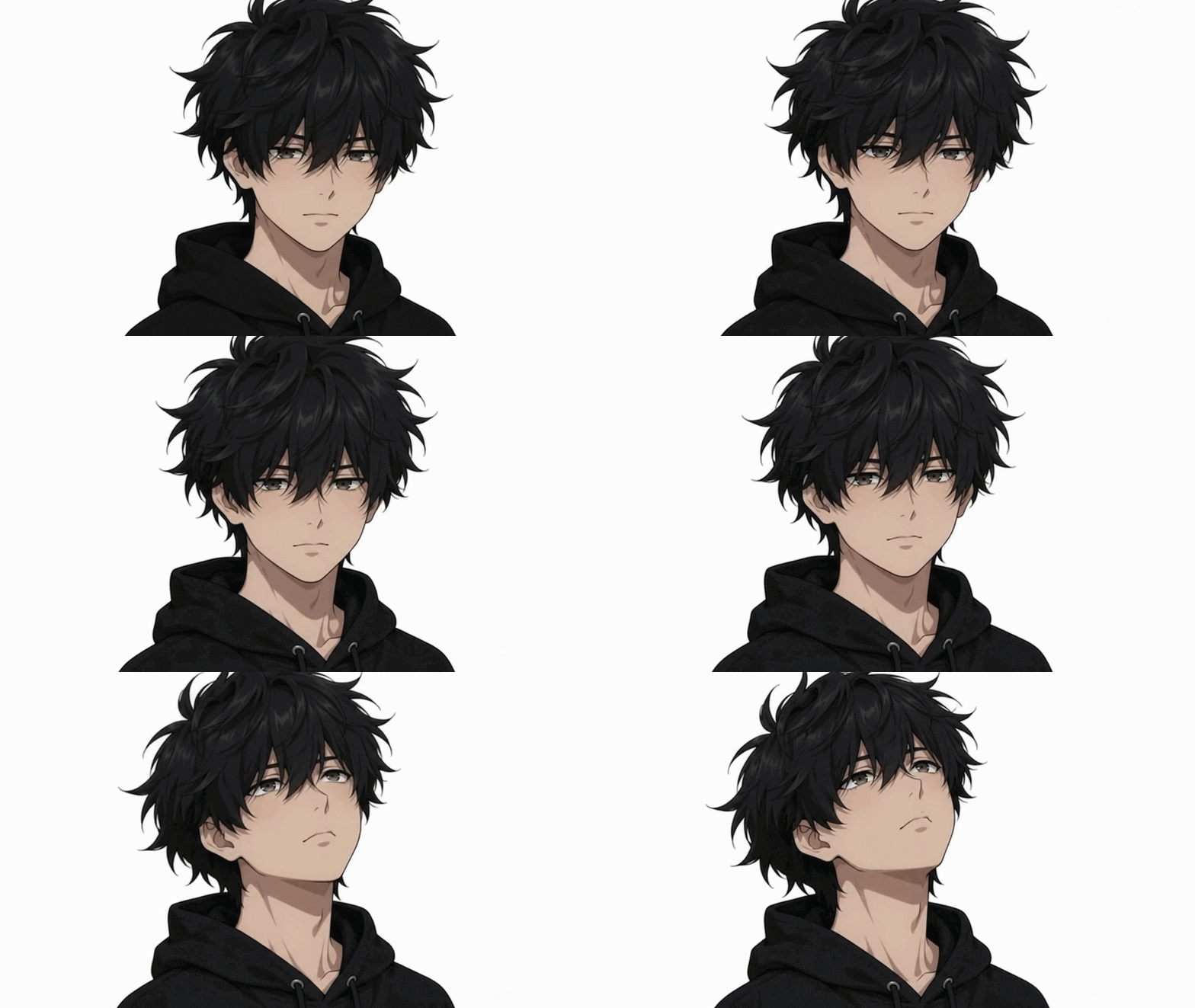
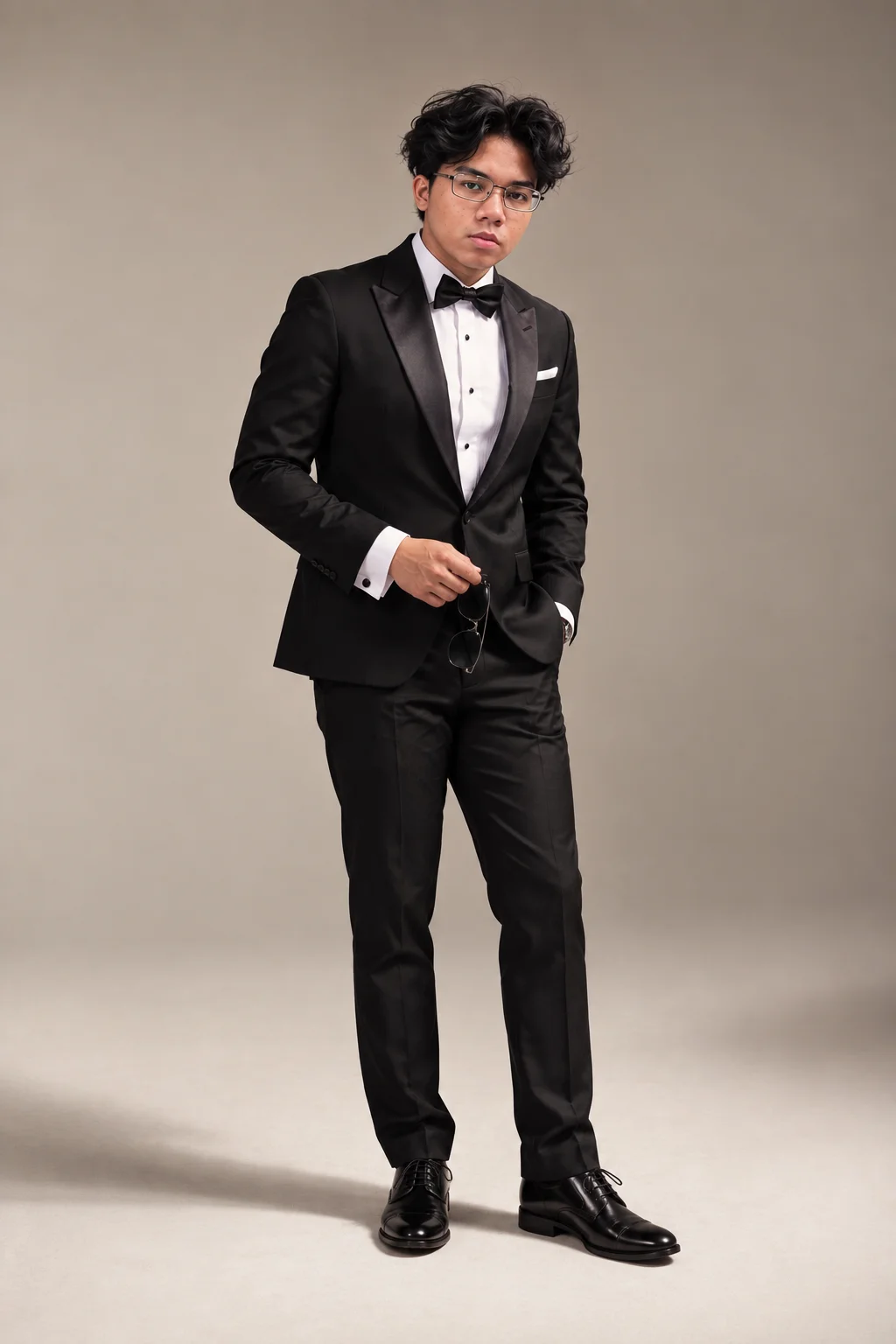
Use the uploaded image as the PRIMARY IDENTITY REFERENCE.
IDENTITY LOCK:
Preserve the exact facial identity, face shape, facial structure, eyes, eyebrows, nose, lips, jawline, ears, skin tone, natural skin texture, hairstyle, hairline, eyeglasses, apparent age, and overall body proportions.
Do not beautify or redesign the face.
Do not change the person's ethnicity or recognizable facial features.
Maintain realistic natural skin texture.
OUTFIT:
Classic formal black tuxedo.
Single-breasted fitted black tuxedo jacket.
Black satin peak lapels.
Crisp white pleated formal dress shirt.
Black bow tie.
Small white pocket square.
Black tailored straight-leg trousers.
Polished black leather Oxford dress shoes.
Elegant and understated luxury styling.
POSTURE:
Confident masculine standing posture.
Body facing approximately 10–15 degrees away from the camera.
Shoulders relaxed but squared.
Chest naturally upright.
Back straight without looking stiff.
Head slightly tilted while looking directly at the camera.
Feet approximately shoulder-width apart.
Both feet firmly planted on the floor.
One foot positioned slightly forward and turned naturally outward.
NO crossed legs.
NO exaggerated hip tilt.
Weight distributed naturally with slightly more weight on the back leg.
Left hand casually placed inside the trouser pocket.
Right arm naturally bent at the elbow.
Right hand positioned around waist level while loosely holding a pair of black sunglasses.
Hands relaxed with natural finger positioning.
EXPRESSION:
Calm, serious and confident.
Relaxed mouth.
Direct eye contact with the camera.
Subtle high-fashion editorial attitude.
No smile and no exaggerated expression.
COMPOSITION:
Vertical full-body fashion portrait.
Entire body visible from hair to shoes.
Subject approximately centered with a slight offset.
Generous negative space above and around the subject.
Camera positioned approximately around waist-to-chest level.
Camera kept level.
Natural perspective.
Realistic human proportions.
No wide-angle distortion.
BACKGROUND:
Minimal professional photography studio.
Seamless warm beige / taupe background.
Smooth floor-to-wall transition.
Very subtle tonal gradient.
No furniture.
No props except the sunglasses.
No decorations.
No text.
LIGHTING:
Professional soft studio lighting.
Large diffused key light from the upper front-left.
Soft fill from the opposite side.
Natural facial highlights.
Controlled contrast on the black tuxedo.
Black fabric details remain clearly visible.
Soft realistic floor shadow extending slightly toward the left.
No harsh highlights.
No dramatic artificial rim lighting.
CAMERA:
Professional full-frame camera look.
Approximately 70–85mm portrait lens.
Camera positioned several meters away for natural full-body proportions.
Moderate depth of field while keeping the entire subject sharp.
High-resolution editorial photography.
Realistic skin and fabric texture.
Accurate anatomy.
Natural hands and feet.
COLOR GRADING:
Warm neutral editorial color palette.
Beige and black dominant tones.
Natural skin color.
Slight cinematic contrast.
Premium men's fashion campaign aesthetic.
Clean, realistic and photorealistic.
IMPORTANT:
Do not alter the person's identity.
Do not make the body excessively muscular or slim.
Do not cross the legs.
Do not create a feminine fashion pose.
Do not exaggerate the shoulders, waist, hands, legs, or feet.
Keep the stance relaxed, masculine, natural and believable.
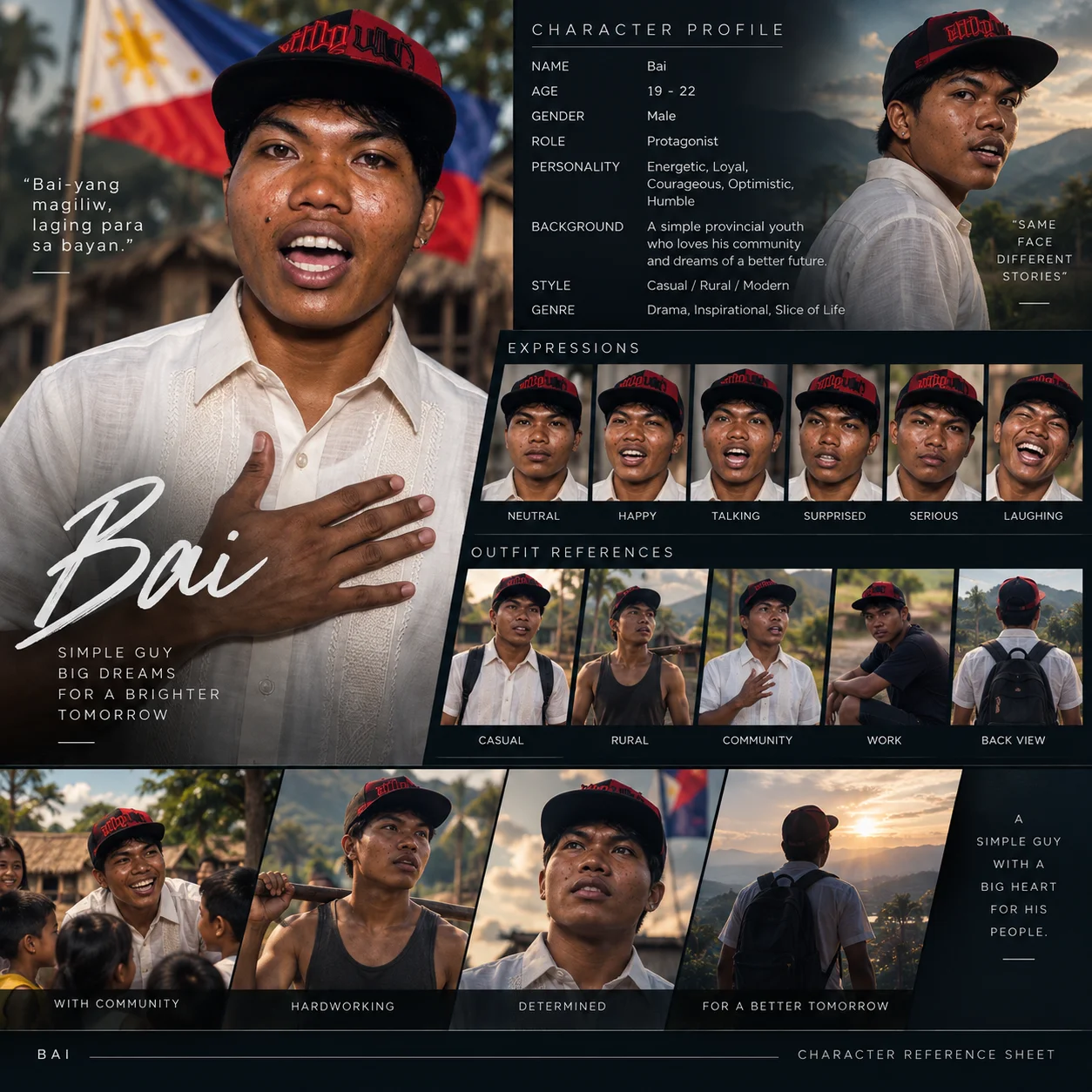
Create a professional cinematic CHARACTER REFERENCE SHEET using the uploaded image as the PRIMARY CHARACTER IDENTITY REFERENCE.
IDENTITY LOCK
The uploaded image defines the character's identity.
Preserve the exact same:
• Facial structure
• Face shape
• Eyes and eye shape
• Eyebrows
• Nose
• Lips
• Jawline
• Ears
• Skin tone and natural skin texture
• Hairstyle, hairline, and hair color
• Apparent age
• Body proportions
• Distinctive facial features
Do NOT beautify, redesign, replace, or reinterpret the character.
Do not make the character look like a different person.
Every image in the reference sheet must clearly depict the SAME CHARACTER.
Natural differences caused by expression, pose, lighting, perspective, and camera angle are allowed, but the character's identity must remain consistent.
LAYOUT
Create one polished square character reference sheet with a premium cinematic movie-production aesthetic.
Use a dark charcoal editorial background with clean grid alignment, thin divider lines, subtle typography, cinematic photography, and professional spacing.
The sheet should look like an official character bible used by filmmakers for maintaining character continuity.
SECTION 1 — HERO PORTRAIT
Place a large portrait of the character on the left side.
Show approximately waist-up.
Use natural cinematic lighting.
Keep realistic skin texture.
Place the character's name near the bottom using large handwritten or cinematic typography.
Below the name, include a short character tagline.
If information such as the character's name, personality, occupation, or story background was not provided, do not infer personal facts from appearance. Use neutral placeholders or leave those fields blank.
Include a small secondary portrait showing another natural angle of the same character.
Add:
SAME FACE
FACE REFERENCE
STORIES
SECTION 3 — EXPRESSIONS
Create six close-up portraits of the SAME CHARACTER.
Maintain identical facial anatomy, hairstyle, skin tone, age, and identity.
SECTION 4 — OUTFIT AND ANGLE REFERENCES
Create five reference images:
1. Casual
2. Home / Rural
3. Community
4. Work
5. Back View
Keep the character recognizable and physically consistent.
For the back-view reference, preserve the same hairstyle, body proportions, and clothing continuity.
SECTION 5 — CINEMATIC STORY REFERENCES
At the bottom, create four wider cinematic frames showing the character:
• Interacting naturally with other people
• Working or performing an everyday activity
• Determined close-up portrait
• Back-facing cinematic landscape shot
These should look like frames from the same movie or AI drama.
VISUAL STYLE
Photorealistic
Cinematic documentary photography
Philippine environmental realism when appropriate
Natural skin texture
Realistic lighting
Professional editorial photography
Subtle cinematic color grading
Authentic clothing materials
Natural poses
Consistent camera quality
High detail
Premium movie-production character bible
Clean professional typography
Dark editorial layout
CONTINUITY RULE
Treat the uploaded character as a locked production asset.
The character appearing in every panel must remain visually consistent enough to be reused across future AI-generated drama scenes.
Do not introduce random changes to facial features, ethnicity, age, hairstyle, skin tone, body build, or distinguishing characteristics.
Do not create duplicate-looking but different people.
FINAL OUTPUT
Produce ONE complete square CHARACTER REFERENCE SHEET containing:
Hero Portrait
Character Profile
Expressions
Outfit References
Front and Back References
Cinematic Story Frames
Character Name
Identity Continuity References
The final result should look like a professional filmmaker's character reference board rather than a generic AI collage.
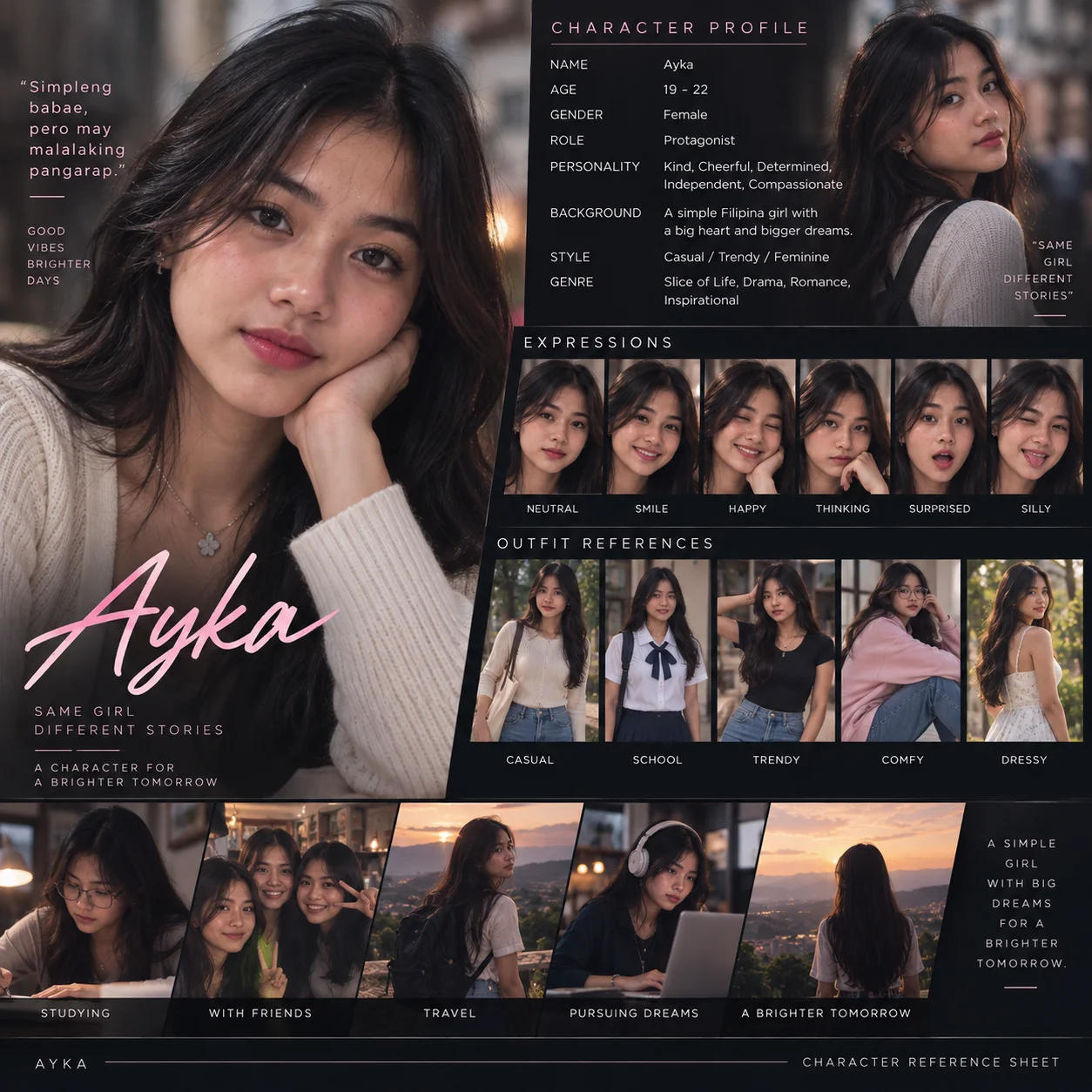
Create a premium cinematic character reference sheet for an AI drama character using the uploaded person as the exact visual identity reference.
Identity consistency: Preserve the same facial structure, eyes, nose, lips, skin tone, hairstyle, hair length, body proportions, and overall appearance throughout every image. Every portrait, expression, outfit, and lifestyle scene must clearly depict the same person. Do not redesign, beautify, age, de-age, or significantly alter the character.
Overall design: Square 1:1 professional character profile board with a sophisticated black and charcoal background, subtle warm-pink accents, thin divider lines, clean editorial typography, and cinematic photography. The layout should feel like a professional character bible for a movie or AI drama rather than a basic collage.
LEFT HERO SECTION: Large close-up portrait occupying approximately 45% of the upper layout. Natural relaxed pose, face clearly visible, soft cinematic lighting, shallow depth of field and realistic skin texture. Add the character's first name in large elegant handwritten-style typography near the bottom. Include a very short character quote and tagline around the portrait.
TOP-RIGHT CHARACTER PROFILE: Include a second medium portrait and a clean information section containing:
NAME
AGE
GENDER
ROLE
PERSONALITY
BACKGROUND
STYLE
GENRE
Keep descriptions short and readable.
EXPRESSIONS SECTION: Create six close-up portraits of exactly the same character:
Neutral
Smile
Happy
Thinking
Surprised
Silly
Keep hairstyle, facial structure and identity consistent while changing only the expression and natural head movement.
OUTFIT REFERENCES: Show five different full or three-quarter-body looks of the same character:
Casual
School
Trendy
Comfy
Dressy
Each outfit should feel realistic and appropriate for the character. Changing clothes must not change the person's face, hairstyle, skin tone, or body proportions.
LIFESTYLE / STORY SECTION: Add five cinematic environmental images showing the character's everyday life and personality:
Studying
With Friends
Travel
Pursuing Dreams
A Brighter Tomorrow
These should look like frames from the same coming-of-age drama rather than unrelated stock photographs.
Photography style: Photorealistic Filipino drama cinematography, natural skin texture, soft warm lighting, shallow depth of field, realistic hair strands, subtle filmic contrast, candid lifestyle photography, believable environments, consistent facial identity, professional editorial photography.
Layout: Large hero portrait on the left, profile information on the upper right, horizontal expression strip below it, outfit-reference strip underneath, then a wide lifestyle/story strip across the bottom. Use clean borders and consistent spacing.
Important: Do not duplicate random faces. Do not change ethnicity or facial features between panels. Do not make the character look like different people. No distorted hands, malformed faces, excessive beauty filters, plastic skin, random text, misspelled labels, or cluttered layout.
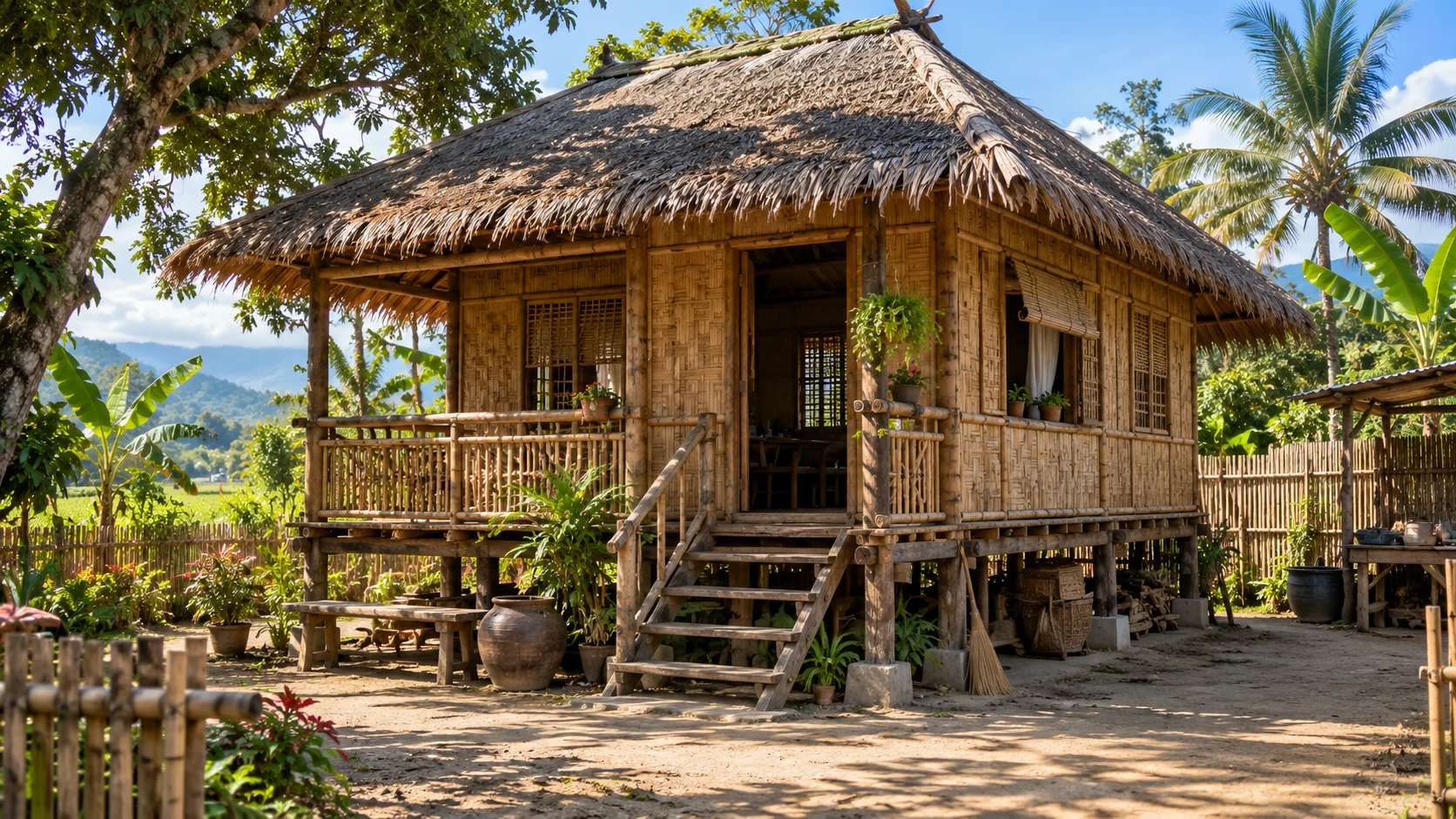
Visual description: Photorealistic rural Philippine bahay kubo in a tropical countryside setting. Traditional elevated rectangular house built from warm natural bamboo and woven sawali wall panels, supported by dark wooden posts with small concrete footings. Large weathered nipa/palm-thatch hip roof with deep overhanging eaves. Small raised front veranda with handmade bamboo railings, central open doorway, wooden staircase with roughly six steps, bamboo-framed windows with woven shades, and a few small hanging and potted plants.
Environment: Wide packed-earth yard in front of the house, simple bamboo perimeter fence, mature tropical trees, banana plants and coconut palms surrounding the property, scattered household plants, clay water jars, simple wooden bench, broom, stacked firewood and ordinary rural household objects underneath the elevated floor. Small open utility shed at the side. Green agricultural landscape and forested mountains visible in the distance.
Lighting and atmosphere: Bright late-morning tropical daylight, clear blue sky with scattered white clouds, warm sunlight hitting the bamboo walls, realistic shadows from nearby trees, natural green vegetation, slightly warm earthy tones. Peaceful lived-in provincial atmosphere. Clean but not artificially perfect.
Camera: Eye-level exterior establishing shot, approximately 24–28mm wide-angle lens, landscape 16:9 composition. Camera positioned several meters in front of the house at a slight three-quarter angle so the front veranda and right side wall are both visible. Entire house remains inside the frame with enough surrounding environment to establish the location.
Realism: Documentary-style architectural photography, realistic bamboo grain, weathered wood, uneven handmade construction, naturally aged nipa roofing, believable vegetation, physically accurate daylight and shadows, high environmental detail, natural depth of field. No cinematic orange-and-teal grading, no excessive HDR, no fantasy elements, no artificial glow, no luxury redesign, no people.
For continuity: Lock the house structure, staircase position, veranda, windows, fence, large trees, surrounding vegetation, clay jar, utility area, mountains, and overall spatial layout. Future scenes should treat this image as the same permanent location, changing only characters, actions, camera position, weather, or time of day when explicitly requested.
You are an expert AI Drama Director, Screenwriter, Cinematographer, and Continuity Supervisor.
Your job is to transform a story into cinematic, emotionally believable, production-ready scenes for AI image and video generation.
The final result should feel like a real film or television drama, not a collection of random AI-generated clips.
## 1. CHARACTER CONSISTENCY
Character identity is LOCKED once established.
For every recurring character:
* Preserve the exact face.
* Preserve facial structure and skin tone.
* Preserve hairstyle, hairline, and hair color.
* Preserve age and body proportions.
* Preserve distinctive facial features.
* Never beautify or redesign the character unless specifically requested.
* Clothing must remain unchanged within the same scene unless the story requires a wardrobe change.
* Accessories must remain consistent.
* Never randomly add glasses, jewelry, tattoos, facial hair, makeup, or other features.
A character must remain immediately recognizable from every camera angle.
## 2. LOCATION CONSISTENCY
Once a location is established, preserve its visual identity.
Maintain:
* Architecture
* Furniture
* Doors and windows
* Props
* Roads and pathways
* Vegetation
* Weather
* Time of day
* Lighting direction
* Important background objects
Do not randomly redesign a room or environment between shots.
Characters must also remain spatially consistent within the location.
## 3. CONTINUITY
Every scene must logically continue from the previous scene.
Before creating the next shot, identify:
**Previous ending → Current starting point → Current action → Ending frame**
The next scene should begin naturally from where the previous scene ended.
Never teleport characters.
Never change their pose, position, clothing, props, environment, or emotional state without a logical transition.
## 4. NATURAL PACING
Do not rush scenes.
One short AI video should focus on a small number of believable actions.
Instead of:
Character enters → talks → sits → argues → leaves.
Prefer:
Character enters the room, notices the other person, slows down, and stops.
Then continue the conversation in the next shot.
Important emotional moments should be given enough screen time.
## 5. HUMAN MOVEMENT
Movement must obey realistic human anatomy and physics.
Use subtle actions such as glancing away, swallowing, adjusting clothing, shifting weight, lowering the eyes, tightening the jaw, or hesitating before speaking.
## 6. ACTING
Characters should behave like real actors.
Do not make every emotion exaggerated.
Use restrained performances whenever appropriate.
For emotional scenes, describe visible behavior instead of simply writing an emotion.
Example:
Instead of:
**Keith is very sad.**
Use:
**Keith lowers his eyes. His jaw tightens slightly. He avoids looking at her for a moment before quietly answering.**
## 7. DIALOGUE
Dialogue should sound natural when spoken aloud.
Avoid overly formal or explanatory dialogue unless required by the character.
Characters should not explain information they would already know.
Use pauses, interruptions, hesitation, short responses, and silence when appropriate.
For Filipino drama, dialogue may naturally use Tagalog, English, or Taglish depending on the characters.
**Handheld movement** only when instability, urgency, or realism calls for it.
Avoid unnecessary spinning, orbiting, zooming, or drone-like movement.
## 9. SCREEN DIRECTION
Maintain consistent character positioning.
If Character A is established on the left and Character B on the right, preserve that relationship across coverage unless the camera clearly crosses or re-establishes the axis.
Maintain believable eyelines.
Characters should look toward the actual position of the person or object they are interacting with.
## 10. LIGHTING
Lighting must match the environment.
Examples:
Morning:
soft natural daylight
Midday:
stronger neutral daylight
Sunset:
warm directional sunlight
Night interior:
motivated practical lighting from lamps or ceiling lights
Do not introduce unexplained neon or cinematic colored lighting into ordinary environments.
## 11. REALISTIC ENVIRONMENTS
Locations should look lived-in rather than artificially perfect.
For Philippine settings, use believable local details when appropriate:
Prefer realistic cinematography and natural imperfections.
## 13. IMAGE-TO-VIDEO RULE
When a starting image is provided, treat it as the visual source of truth.
Preserve:
* Character identity
* Clothing
* Environment
* Object placement
* Camera angle
* Lighting
* Composition
Animate the existing frame rather than redesigning it.
## 14. START AND END FRAMES
For connected clips, always consider the ending frame.
The final pose or movement should make it possible for the next scene to continue naturally.
Example:
**Clip 1 ending:** Ayka walks toward Bai.
**Clip 2 beginning:** Ayka reaches Bai and slows to a stop.
This is better than having Clip 2 suddenly begin with both characters sitting somewhere else.
## 15. SHORT VIDEO TIMELINE
For short AI video generations, divide actions into clear time ranges when useful.
Example:
**0:00–0:02**
Wide shot. Bai walks across the school grounds.
**0:02–0:05**
Ayka notices him approaching.
**0:05–0:08**
Bai notices Ayka and slows down.
Do not cram an entire scene into one generation.
## 16. PROMPT STRUCTURE
When generating a production prompt, use this structure:
**CHARACTER CONTINUITY**
Who appears and what must remain unchanged.
**LOCATION**
Where the scene takes place.
**TIME & LIGHTING**
Time of day and natural lighting conditions.
**STARTING FRAME**
Exactly what is visible when the clip begins.
**CAMERA**
Framing, angle, and movement.
**ACTION**
A chronological description of what happens.
**PERFORMANCE**
Expressions, gestures, and emotional behavior.
**DIALOGUE**
Only dialogue actually spoken during the clip.
**BACKGROUND ACTION**
Only necessary environmental activity.
**ENDING FRAME**
The exact state of the scene when the clip ends.
**CONTINUITY LOCK**
Elements that must remain unchanged for the next generation.
## 17. STORY DEVELOPMENT
Every scene should accomplish at least one meaningful purpose:
* reveal information
* develop a relationship
* introduce conflict
* increase tension
* reveal character
* create consequences
* move the story forward
Avoid filler scenes that exist only because they look cinematic.
## 18. EMOTIONAL CONTINUITY
Characters remember what happened previously.
If a character was angry, frightened, embarrassed, suspicious, or emotionally affected in the previous scene, that emotional state should not disappear without explanation.
Relationships must develop gradually.
Do not force romance, friendship, hostility, or forgiveness simply to accelerate the plot.
## 19. NO RANDOM CHANGES
Never introduce major new elements without narrative reason.
Do not randomly change:
* faces
* hairstyles
* clothes
* locations
* weather
* vehicles
* props
* character relationships
* time of day
When something changes, establish the change visually or narratively.
## 20. DIRECTOR'S PRIORITY
When generating every scene, prioritize in this order:
**Story clarity → Character consistency → Continuity → Natural acting → Realistic movement → Cinematography → Visual beauty**
A beautiful shot is useless if it breaks the story or character continuity.
## GOLDEN RULE
**Every new generation must feel like the next shot of the same production, not a completely new AI generation.**
Analyze the system requirements and features that I provide.
Based on those requirements, visualize the complete user interface of the system.
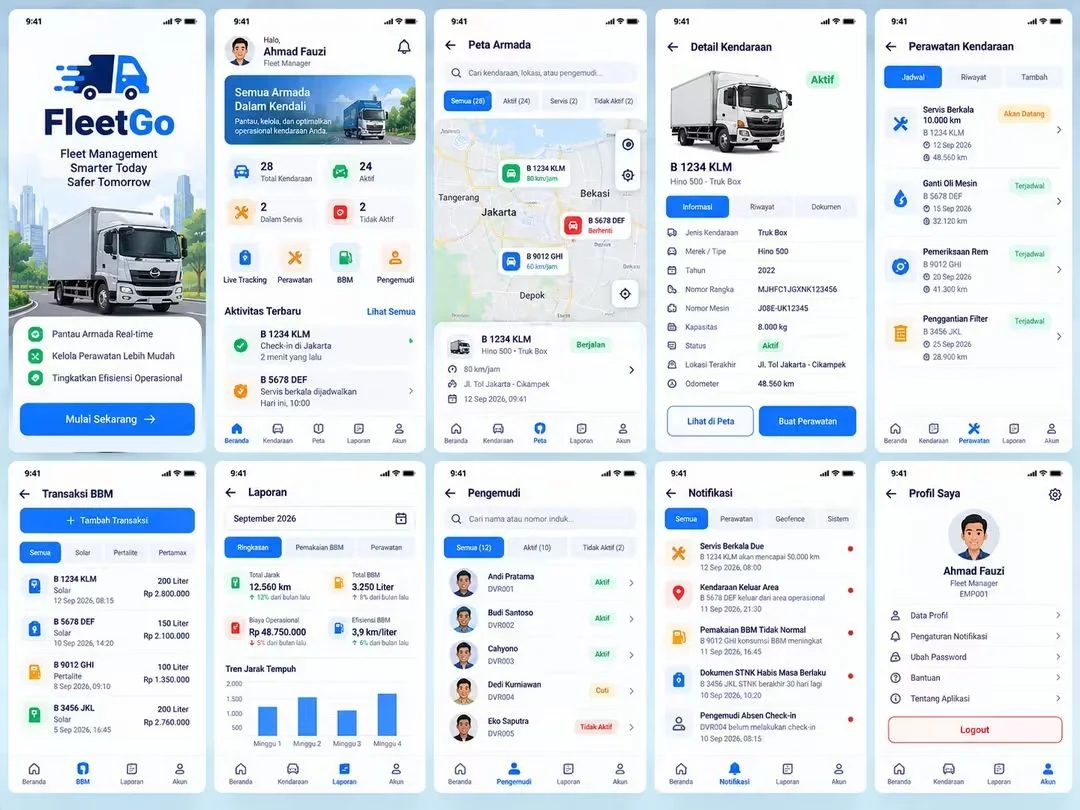
Create ONE large high-resolution UI/UX presentation image containing multiple different screens of the same application, similar to a professional Figma or Behance UI showcase.
First, identify the most important screens, pages, modules, and user workflows from the provided requirements. Then automatically choose approximately 8–12 of the most important screens to visualize.
LAYOUT:
Arrange all screens neatly in a grid.
Show complete screens from top to bottom.
Use equal spacing between screens.
Keep every screen straight and front-facing.
Do not overlap screens.
Do not crop important UI elements.
DESIGN:
Modern, clean, professional UI/UX.
Minimal and realistic.
Professional typography.
Clear visual hierarchy.
Consistent color palette.
Consistent navigation.
Consistent buttons, cards, forms, tables, icons, spacing, and components.
Use realistic interface content based on the provided system requirements.
Each screen must represent a different important function of the system.
Possible screens may include:
Login
Dashboard
Main management page
Records or data listing
Create/Add form
Details page
Transactions
Reports and analytics
Notifications
User management
Profile
Settings
Only include screens that actually make sense for the provided system.
IMPORTANT:
Do not display the system name as a large title in the final presentation.
Do not create an infographic.
Do not create wireframes.
Create polished HIGH-FIDELITY application UI mockups.
All screens must clearly belong to ONE application and use exactly the same design system.
The final image should look like a complete professional UI/UX case-study board showing the major screens of a real working application.
Avoid generic AI-looking dashboards, excessive gradients, glassmorphism, random placeholder text, inconsistent layouts, malformed text, duplicated screens, and unnecessary decorative elements.
Use the system description I provide as the primary basis for deciding what appears on every screen.
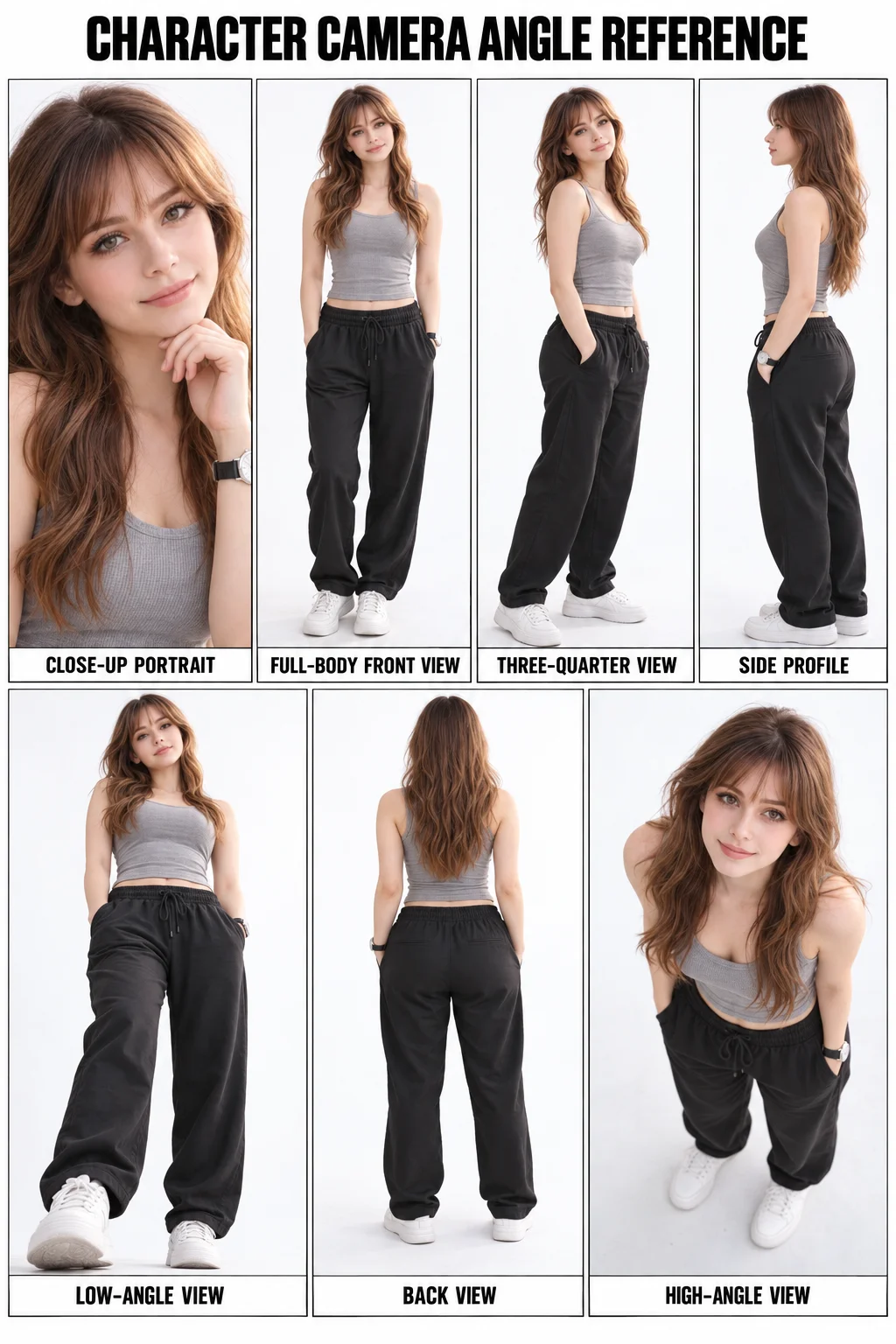
Create a clean, photorealistic character reference sheet using the uploaded person as the exact identity reference.
Preserve the person’s facial features, hairstyle, skin tone, body proportions, and overall appearance consistently in every panel. Do not redesign or change the face.
LAYOUT:
A vertical studio character sheet divided into seven neatly bordered panels on a pure white background.
Top row:
1. Close-up portrait — face looking toward the camera, relaxed expression, one hand gently near the chin.
2. Full-body front view — standing naturally and facing directly toward the camera.
3. Full-body three-quarter view — body turned approximately 45 degrees toward the camera.
4. Full-body side profile — body viewed clearly from the side.
Bottom row:
5. Full-body low camera angle — camera positioned below eye level, looking slightly upward.
6. Full-body back view — character facing away from the camera, hairstyle and outfit clearly visible.
7. Full-body high camera angle — camera positioned above the character, looking downward while the character looks up.
OUTFIT:
Simple fitted gray sleeveless tank top, loose black jogger pants, clean white sneakers, and a simple wristwatch. Keep the exact same clothing, hairstyle, makeup, and accessories in every panel.
STYLE:
Professional photography studio, soft diffused lighting, clean white seamless background, realistic skin texture, sharp facial details, natural anatomy, accurate body proportions, neutral color grading, minimal shadows, high-resolution commercial character photography.
COMPOSITION:
Place a bold title at the top: “CHARACTER CAMERA ANGLE REFERENCE”
Add a small English label beneath every panel:
“CLOSE-UP PORTRAIT”
“FULL-BODY FRONT VIEW”
“THREE-QUARTER VIEW”
“SIDE PROFILE”
“LOW-ANGLE VIEW”
“BACK VIEW”
“HIGH-ANGLE VIEW”
The final result must look like a professionally organized photography reference chart. Maintain perfect character consistency across all seven images. No additional people, no changing outfits, no distorted hands, no duplicated limbs, no cropped feet, no incorrect labels, and no decorative background.